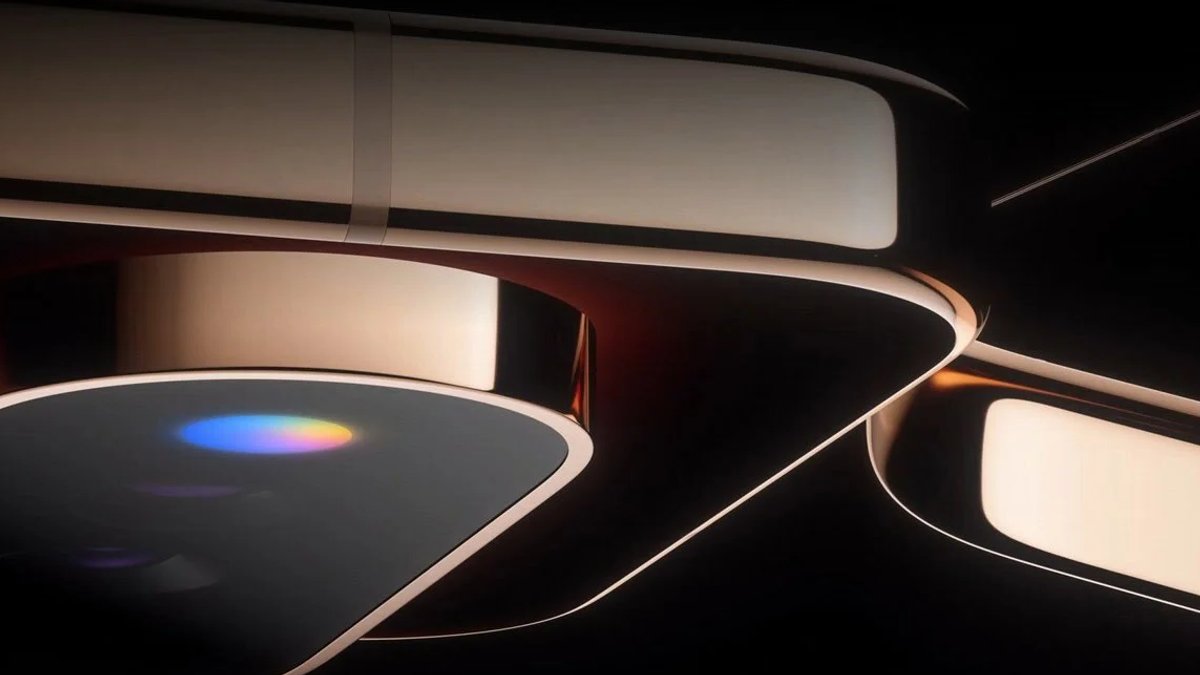
The Pixel 11 series will feature a new RGB feature called HiLight for discreet notifications, according to recent leaks. The feature was previously referred to as Pixel Glow, but a rumor surfaced earlier this week claiming that Google would be using the HiLight name instead.
A new leak from well-known leaker Roland Quandt on Bluesky has confirmed that HiLight is the official name for this feature. The leak includes a marketing image for the Pixel 11 Pro Fold, which shows off the glowing RGB LED.
What is HiLight?
HiLight will alert users when their favorite contacts are calling them and when they’re chatting with Gemini and receiving a response. The feature will discreetly illuminate when the smartphone is turned upside down.
The description of HiLight reads: “Stay informed without looking at your screen. When your smartphone is turned upside down, HiLight discreetly illuminates when your favorite contacts call you or when you chat with Gemini.” This functionality suggests that HiLight is designed to provide users with a subtle and non-intrusive way to stay informed about important notifications, without having to constantly check their phone.
In terms of its implementation, HiLight appears to be a thoughtful feature that takes into account the user’s environment and preferences. By only illuminating when the phone is turned upside down, HiLight minimizes distractions and allows users to focus on their surroundings. This could be particularly useful in situations where users need to be mindful of their phone’s presence, such as in meetings or when engaging in activities that require their full attention.
Comparison to Older Android Phones
The HiLight feature is not entirely similar to the RGB LEDs on older Android phones. Those older lights could be customized to blink specific colors and tie those colors to specific apps, resulting in different colors for various important notifications.
Related: Why Reviewing Employment Contracts and Protecting Your Workplace Reputation Matters in Ontario
The HiLight description does not mention if this level of customization is possible with the new feature. However, it’s clear that HiLight is designed to provide discreet notifications, which could be useful in certain situations. The lack of customization options may be a deliberate design choice, as it allows HiLight to focus on providing a simple and intuitive notification experience.
In the middle of all the leaks and rumors, it’s worth considering why a feature like HiLight might be important. For many users, being able to receive notifications without having to constantly check their phone could be a significant advantage, especially in situations where they need to be focused on something else. This could be particularly useful in meetings or when working on tasks that require a lot of attention.
Google has teased HiLight on the Pixel 11 Pro and Pixel 11 Pro XL as well, in addition to the Pixel 11 Pro Fold. This suggests that the feature will be available on multiple devices in the Pixel 11 series, providing a consistent notification experience across different devices.
As more information becomes available, it will be interesting to see how HiLight is received by users and how it compares to other notification features on the market. For now, it seems like a useful addition to the Pixel 11 series, one that could enhance the overall user experience and provide a unique selling point for Google’s upcoming devices.
The fact that HiLight is being promoted as a key feature of the Pixel 11 series suggests that Google is confident in its ability to provide a valuable and innovative notification experience. By leveraging the capabilities of RGB LEDs and designing a feature that is both discreet and informative, Google may be able to differentiate its devices from those of its competitors and attract users who are looking for a more refined and intuitive notification system.



Leave a Reply